Features
Every module, and what each one actually does.
Nine modules, one record. Below is the tour a practitioner asks for: what the module is for, the problem it exists to solve, and precisely what it does about it — including the two or three places where it deliberately stops and asks a person.
Company Secretarial
The statutory record, kept the way it has to be defended.
The problem. A register held as a table of current facts cannot answer the question a member, an auditor or an inspector actually asks — who held what on 3 April 2024. A shared drive of Word files cannot answer it either, and a template will happily minute a transfer of 500 shares the member does not hold.
Registers with an as-at view
Every register change writes a dated entry in the same database transaction as the change itself, so a register that moved without a history entry is not possible by construction. Entries are never edited or deleted: a mistake is corrected by a reversing entry that cites the original, which is how a paper register is corrected and, unlike an in-place edit, leaves the mistake visible.
The log replays into the position as it stood on a past date, and the replay is compared with the live tables — so a write that bypassed the workflow is detected rather than assumed away.
Fourteen corporate actions
Transfer and allot shares; buy back; sub-divide; consolidate; appoint and remove directors and secretaries; record a PSC and record one ceasing; move the registered office; change the accounting reference date; change the company name.
Each is a structured definition rather than a free-text form — which register it touches, which fields it needs, and whether the members must resolve rather than the board alone — checked against the company’s actual position before anyone can approve it, and applied to the register only after they do.
An inherited register, evidenced
Almost every company a practice takes on has a correct register and nothing explaining how it came to be. The opening position records the register as it stood on the day you took the company on, with the evidence it rests on named and an approver against it.
It changes nothing — the live rows were already right. It means “as at” works from that date forward, and that an integrity check which fires on every migrated company and never clears does not have to be ignored.
Filing preparation for twelve Companies House forms
SH01, SH02, SH03, AP01, AP03, TM01, TM02, PSC01, PSC07, AD01, NM01 and AA01. Each form’s whole field set is modelled, and every field is marked as one your records supply or one only a person can — the authorised signatory, the consent to act, the stamp duty on an SH03 over £1,000, the split of a single held name into forenames and surname. That second list is the work, and the product shows it before you start rather than handing you a form with plausible blanks.
- Deadlines come from the statute, not from arithmetic. An SH01 is one month under s.555 — and one month from 31 January is 28 February, not 2 March.
- An AD01 has no deadline at all: under s.87 the change takes effect on registration, so the product says so rather than counting down to a date that does not exist.
- Arithmetic is checked before anything is packaged — a sub-division that would change the company's total nominal capital, an SH01 whose statement of capital omits the shares being allotted, a PSC condition that is not in the registrar's own wording.
- Errors block; warnings do not. Blur the two and the product either becomes unusable or lets a wrong filing through.
- The result is a sealed, content-hashed package: the artefact a person at your practice takes to Companies House.
A share transfer produces no form at all, because it is not separately notified — it is reported on the next confirmation statement. The product says that too.
14
corporate action types
Each with its register, its required fields, and whether the members must resolve.
12
Companies House forms prepared
Every field marked register-supplied or human-supplied before the work starts.
0
filings transmitted
The transport client's every method throws and opens no socket. The boundary is checkable in about a minute: grep for fetch.
Ownership Assurance
Who owns what, and the reason behind every number.
The problem. The share register you inherit is a PDF, a spreadsheet and somebody’s memory. The public filings that would prove it are spread across twenty years of incorporation documents, allotment returns, transfers and confirmation statements — and they do not always agree with each other.
Reconstruction you can audit
- The canonical engine rebuilds the share register from the filings and states, holder by holder, which filing each figure came from and what it said.
- Register confidence is scored and banded high, medium or low, with its reasons printed — a recent CS01 on file, a complete filing chain, classes that reconcile, shareholders who could not be resolved to one identity, assumptions the rebuild had to make.
- That is deliberately not the same measure as whether the ownership conclusion should be approved. A company can carry high confidence in its ownership and low confidence in the rebuild behind it, and conflating the two hides exactly the case worth looking at.
- Corporate shareholders are resolved through to the people behind them, so a chain of holding companies produces an ultimate ownership position rather than a dead end.
Checks, conflicts and the apply gate
- PSC positions are reconciled in both directions: expected PSCs derived from the reconstructed ownership against the PSCs actually filed. Each pair lands as consistent, a missing PSC, an additional PSC, or one that may rest on voting or control rights rather than shares.
- The PSC review reports. It never creates, alters or files a PSC.
- Where the allocated shares exceed the issued shares, the register is over-allocated, percentages cannot honestly be calculated, and the engine says so instead of picking a number.
- One add-only apply engine writes to the live register, after a reconciliation check and a confirmation showing exactly what will be written. It adds; it never silently removes. Nothing reaches the register until a person decides it should.
Practice Management
Clients as records, not labels on a company.
The problem. Most compliance software treats the company as the record and the client as a field on it. Then the partner asks which clients are actually ours, who is responsible for each, and — the question that arrives the day the practice passes about ten people — which clients a particular member of staff must not be able to open.
- The client is a first-class record: entity type, risk rating, AML status, engagement status, responsible partner and account manager, with its companies hanging off it.
- Ten built-in views — all, mine, unassigned, needs AML review, high risk, missing information, recently added, recently updated, inactive, archived — each with a live count on its chip.
- Saved views for the combinations only your practice needs. Personal by default; a manager can share one with the whole practice. A saved view stores the same query string the list already understands, so it is a managed bookmark rather than a second filtering path, and the parameters it may hold are allow-listed.
- Bulk assign, bulk status and bulk chase, for the point above about fifty companies where one-at-a-time stops working. Each batch is bounded, intersected with what the caller may actually see, gated by the same role check as the single-record path, and audited one entry per client — so the trail answers what happened to this client, not that a batch ran.
- Nothing is swallowed: a bulk action reports how many ids it skipped and why, so a silent partial success is impossible.
The client-visibility conflict wall
Two layers, and they are not the same thing. Tenancy — a client belongs to exactly one practice — is absolute, always enforced and not configurable. Visibility, meaning which of your own staff may see which of your own clients, is configurable, because a sole practitioner and a twenty-person firm with a conflict wall need different answers.
- Two modes: open, or assigned-only, with a separate switch for whether managers still see the whole book.
- The restriction is a database query fragment composed into every read — the client list, companies, deadlines, search, the company secretarial worklist and the document packs — not rows hidden in the interface after they have been fetched.
- A restricted list says why it is restricted, so it never reads as missing data.
- The default is open, which reproduces exactly what a practice had before. An upgrade never silently hides a client from someone who could see it yesterday; a firm turns the wall on deliberately.
Deadlines & worklists
One queue, in the order a Monday actually runs.
The problem. A deadline typed into a spreadsheet drifts from the company it belongs to the moment either changes. And a worklist that lists everything lists nothing: the partner needs to know what is waiting on a decision before they need to know what exists.
- Deadlines are computed from the record — accounts, confirmation statements, VAT returns and corporate action filings — so they cannot drift from the company they describe.
- Priority is derived from the date rather than typed in: overdue is critical, the next week is high, and the list re-sorts itself without anybody maintaining it.
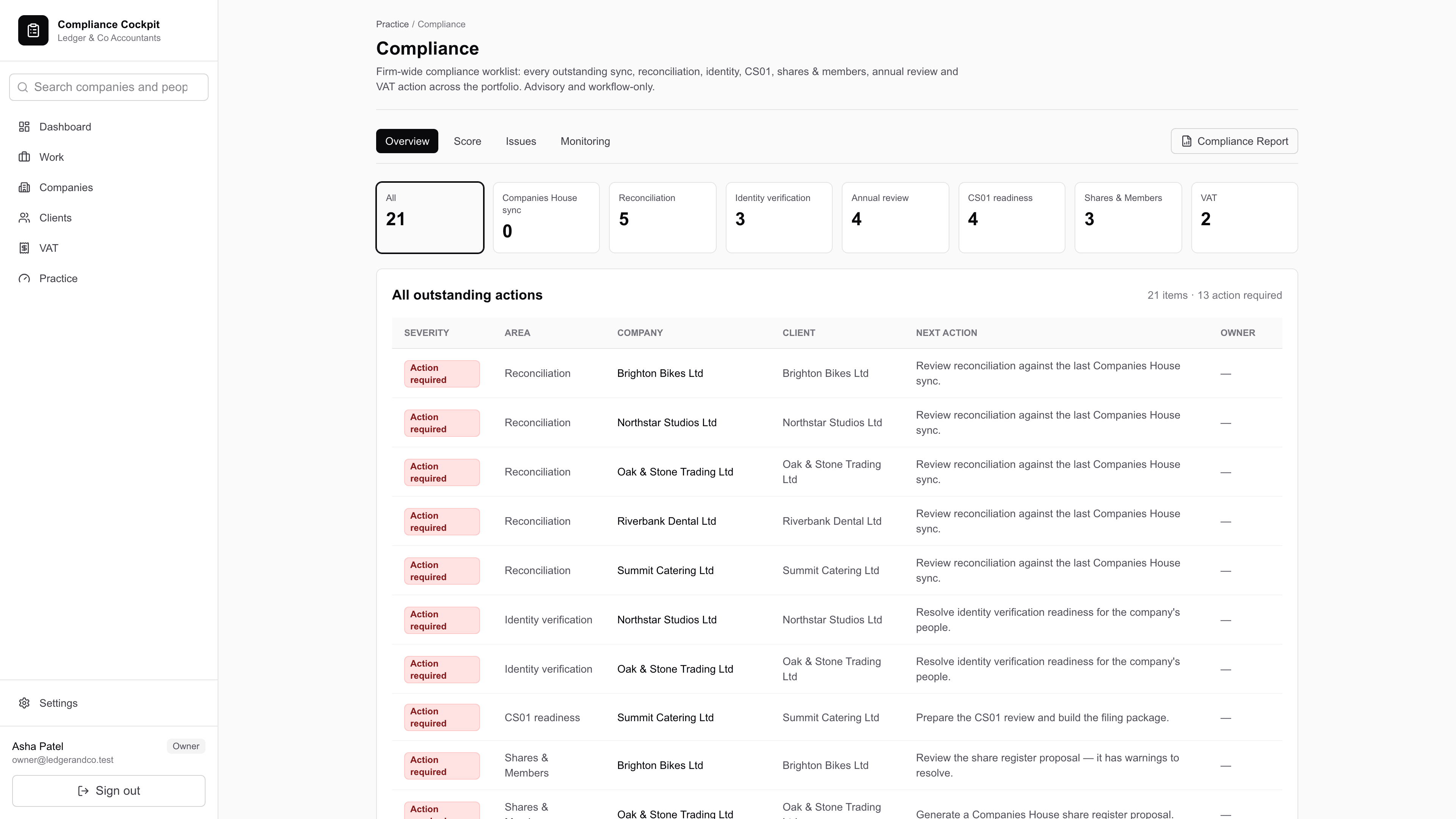
- The Compliance worklist gathers every outstanding action across the portfolio by area — Companies House sync, reconciliation, identity verification, annual review, CS01 readiness, shares and members, VAT — and spells out the next action for each, with the company and the client beside it.
- The Company Secretarial dashboard is ordered the way the work arrives: what is waiting for your decision, what is late, what is half-finished, and where the records disagree with each other.
- Every figure is a count over the query its drill-down repeats exactly, so a number can never disagree with the page it opens.
Client Portal
An approval that proves what was approved.
The problem. A client’s “yes, go ahead” at the bottom of an email thread proves that somebody typed yes. It does not prove what they were looking at when they typed it, and that is the only part anyone will care about if the consent is ever challenged.
- The approval shows the client the actual documents — the board minutes, the written resolution — rendered to be read, not a title and whatever covering note the practice typed.
- The document generator is reproducible and content-hashed, and the hash of what was shown is captured at the moment approval is requested. Regenerating the pack a year later proves whether the client agreed to that exact document, rather than resting on nobody having changed it.
- Every portal read and write takes the client id from the session, never from the request, so a portal user cannot see or answer another client's approval by guessing an identifier.
- Portal users exist only by explicit invitation. The client role is not a role your practice can assign to staff, and it carries none of the practice permissions.
- Decisions carry the decision notes and the time they were made, and land in the same audit trail as everything else.
Documents
Documents that refuse to assert what the records cannot support.
The problem. A Word template records what somebody typed. It will produce signed minutes stating that the directors satisfied themselves the company had distributable profits — when nothing in the file says whether they did, and the accounts are not in the system to check.
- Board minutes, general meeting minutes, members' and directors' written resolutions, and ordinary and special resolution copies — generated from the approved corporate action and the register behind it, and rendered to PDF.
- The document pack is the thing a company secretary actually wants: the minutes, the resolution, the register entries and the audit summary, in the order a file is read.
- A pack is assembled on demand from the record rather than stored as a second copy, so it cannot drift from what it describes. It is content-hashed, so regenerating it a year later either produces a byte-identical document or proves it changed.
- Every pack names its own omissions — what is not in it, as plainly as what is.
The rule the generator will not break
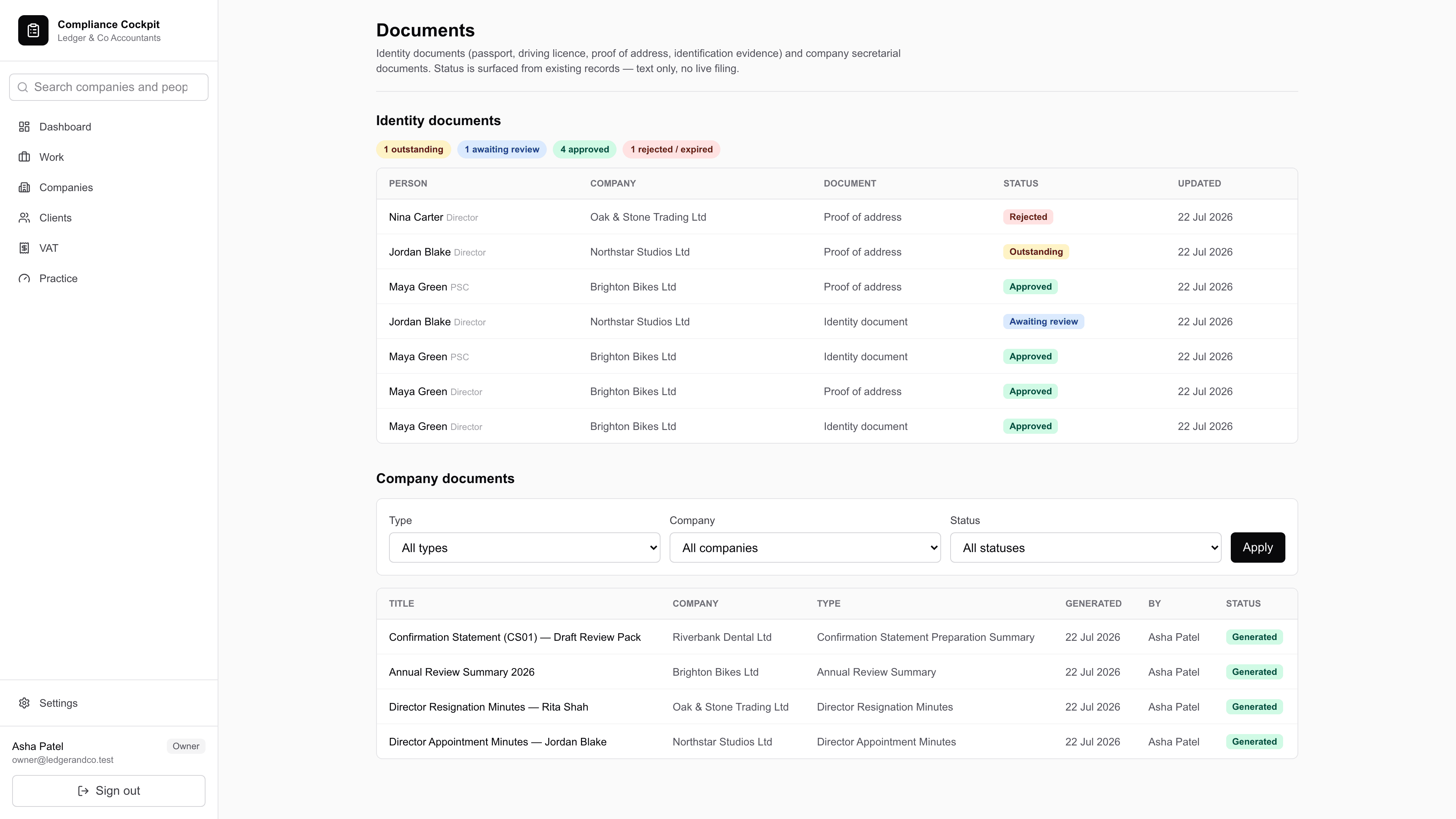
Where a legal fact cannot be proved from the records held, the document does not assert it. It prints a bracketed instruction to complete the point before signing, and says why the system could not: it does not hold the company’s articles, so it cannot confirm that a right of pre-emption on a transfer was complied with or waived; it does not hold the accounts, so it cannot confirm that profits available for distribution cover a proposed dividend.
Everything generated is a draft for a qualified person to complete, check and sign. It is not legal advice, and it does not pretend to have been present at the meeting it minutes.
VAT & Making Tax Digital
Nine boxes, and the spreadsheet cell each one came from.
The problem. Making Tax Digital asks for a digital link from the source record to the return. A figure retyped from a spreadsheet into a portal has no link, no provenance, and nothing to show a VAT officer who asks where box 6 came from.
- The VAT work planner holds every period across the portfolio with its workflow state, filter chips that count what is in each, and an allocation board showing who is carrying too much.
- A reconciliation panel compares the obligations HMRC lists against the periods your planner holds, so a period nobody set up is visible rather than silently absent.
- Bridging imports the nine boxes from a spreadsheet export as a strict CSV — nothing coerced, nothing guessed — through a preview that writes nothing, then a confirm that re-derives every figure server-side from the re-uploaded bytes rather than trusting what the browser previewed.
- Each box keeps a structured link to the source file and the cell it came from, and the return's integrity is derived from the links that actually exist. A mismatch between the asserted source value and the saved box blocks submission rather than warning about it.
- Returns are versioned immutably, so an amended figure adds a version rather than overwriting the one somebody already approved.
Where the HMRC connection stands
The MTD VAT connector has three modes. Not connected, where every call returns a safe empty state. Sandbox, where realistic sample data is generated locally and the screens label it as such — nothing leaves the building. And live, which requires HMRC production recognition, a stored OAuth grant and complete fraud prevention headers. Which mode you are in is a deployment decision your practice makes, and the product tells you on screen which one you are looking at.
Pilot deployments ship without HMRC credentials at all, so the mode resolves to not connected and no submission is possible. That is separate from Companies House, where the boundary is in the code rather than the configuration.
Advisory reporting
The compliance work, turned into something a client will pay for.
The problem. Corporate records tidying is real work that clients rarely see and almost never pay for, because nothing about it arrives on their desk as a deliverable.
- The Corporate Records Health Check scores a company from facts already held — the share register, the reconciliation status, the filing history, identity verification and the PSC position — and bands the result by risk.
- It computes live and stores nothing until you ask it to. Generating a report is an explicit act that persists a point-in-time snapshot: the dated artefact you send, and the one you can be asked to reproduce.
- A portfolio view ranks every company by risk score, so the conversation starts with the clients who need it most rather than the ones who happened to ring.
Permissions & audit
Who may do what, and a record of who did.
The problem. Role systems fail quietly in one particular way: the interface shows somebody a button and the action behind it refuses them. The user cannot tell a permission boundary from a bug, and rings you about it.
Roles
- Four practice roles: owner, admin, manager and staff — full control, practice administration, senior operational review and approval, and the daily work.
- The client-portal role is separate and is not assignable to staff.
- Each boundary is one named rule, used by both the page that renders a control and the action behind it — so a manager is not shown every control and then refused by all of them.
- Only an owner or admin may add, replace or remove a company authentication code, the most sensitive thing the system holds.
- Approving a corporate action and marking work ready to file sit with managers and above.
The trail
- Every consequential write records the practice, the user, the entity, the action and the detail — including the ones performed in bulk, one entry per client rather than one per batch.
- Statutory register history is a separate, immutable record with its own sequence per company: nothing in it is updated or deleted, and a correction is an entry that cites what it corrects.
- Document packs carry the audit summary with them — who did what, when — because that is the first thing a reviewer reads.
- Every query is scoped to your practice. Cross-tenant isolation is covered by an automated attack suite that runs on every change.
The boundary, stated plainly
Prepared to the edge. Sent by a person.
Compliance Cockpit prepares Companies House filings and stops: the form, the data, the statutory deadline, the documents and a sealed package — which somebody at your practice submits. No statutory register moves, and no ownership proposal is applied, until a person decides it should.
That boundary is why the output is defensible when a client, an auditor or a court asks where a figure came from.
Half an hour against your own portfolio. We will show you the parts that do not work yet as well as the parts that do.